AcuTransportation

Trucking modules that live inside Acumatica

AcuTransportation is a set of modules built natively on Acumatica Cloud ERP for trucking companies: Freight Billing, Maintenance & Repair, Dispatch and Fuel. One truck file, one customer list, one general ledger, no interface to babysit.

Why inside the ERP

Advantages of combined accounting and TMS systems

When the TMS and the accounting system are one system, a load is entered once and flows from the order to the invoice to the general ledger. Customers are keyed once. Invoices post on time and to the right accounts. The shop uses the same inventory the controller reconciles, and every report reads the same numbers. There is no interface to babysit and no month-end reconciliation between two databases.

AcuTransportation is built with Acumatica's own customisation framework, so its screens, tables and workflows are Acumatica screens, tables and workflows. The truck a dispatcher assigns is the truck the shop services and the truck whose cost the controller reports on. Parts come from Acumatica inventory. Outside repairs become Acumatica payables. Invoices and settlements land in Acumatica receivables and payables. There is no second system.

What the modules share

  • One truck file. Unit, type, meters, status and permits, used by every module.
  • Acumatica's customers and vendors. No duplicate master data.
  • Acumatica inventory and warehouses. Parts issued to a work order are real inventory transactions.
  • Acumatica receivables, payables and the general ledger. Invoices, settlements and repair bills post where the controller expects.
  • Acumatica security, reporting and business events. Roles, generic inquiries, dashboards and email alerts work on our data too.
  • Fleet tracking. Odometer, engine hours and fault codes from the trackers the trucks already carry (Samsara today).
Maintenance & Repair

Preventive maintenance, the shop floor and the true cost of every truck

Fleets lose trucks to breakdowns that a PM would have caught, and lose money to repairs nobody can trace to a unit. Maintenance & Repair keeps the truck file, its meters and permits; tracks what is due; turns it into work orders; runs the shop; and puts the cost on the truck.

Know what is due before it fails

Every maintenance action can be due by miles, engine hours or time, and the first one to arrive wins. Time rules understand real calendars: "every 90 days from the last service" or "the second Tuesday every three months", and they survive a service done early or late.

Catalogue and schedules

  • Vehicle systems (VMRS-style codes) as the skill a job needs
  • Maintenance actions by category: preventive, safety, compliance, repair, with estimated labor hours
  • Templates on each action: parts, outside repairs, instructions, estimated cost from your own warehouse costs
  • Service schedules that group actions, assigned to trucks in bulk
  • Shops with a default warehouse and labor rate; a home shop per truck

Due tracking

  • Due status per truck and action: overdue, due soon, OK
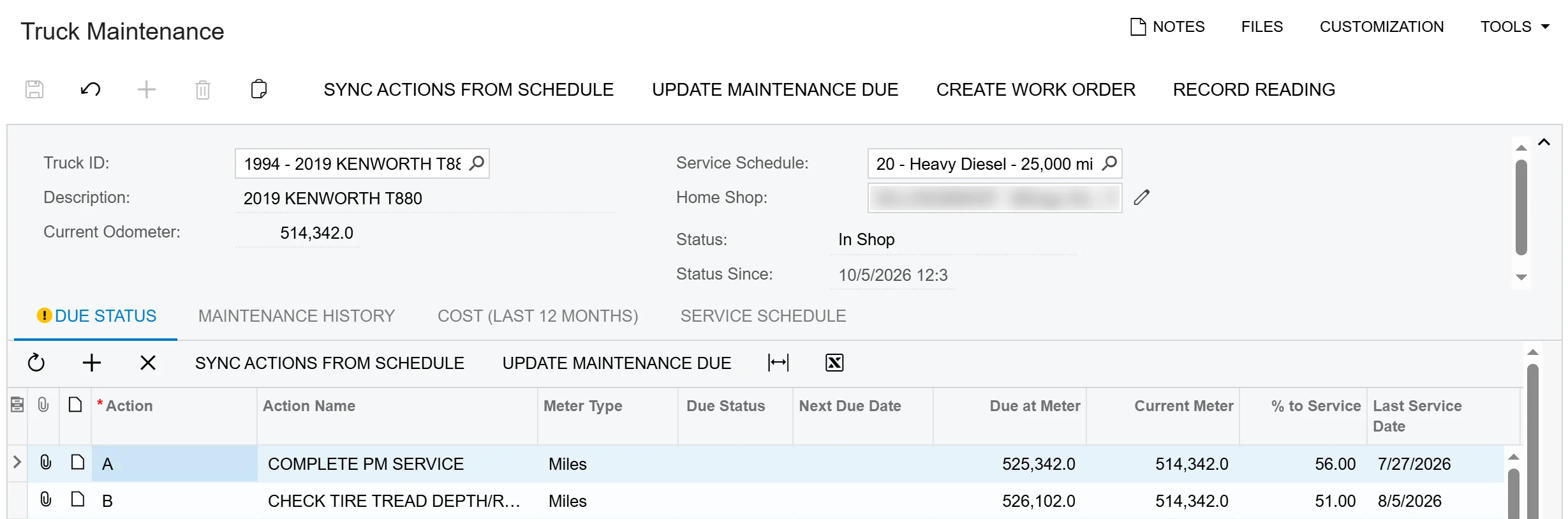
  • Truck Maintenance view: due status, history and the schedule in plain words
  • Fleet-wide Update Maintenance Due, run nightly
  • PM Compliance inquiry with a fleet compliance percentage

The truck itself

  • One truck record for every module: fleet unit type, current odometer and engine hours, Samsara pairing
  • Status with history: In Service, In Shop, Out of Service, Inactive or Disposed, with since-when and the reason; work orders move it In Shop and back
  • Permits per truck with expiry dates, due-soon warnings and an expired-permit email alert

Meter readings

  • Odometer and engine hours entered by hand, imported, pulled from Samsara or captured on a work order
  • Readings roll up to the truck's current meter, so due dates follow the real miles
  • Nightly Samsara update for the whole fleet, scheduled once at install
Truck Maintenance screen in Acumatica showing a Kenworth T880 with its service schedule and maintenance due by miles
Truck Maintenance: what is due on each truck, by miles, hours or date

Three ways work arrives, one work order

Work orders are generated from what is due, raised from fault codes the trucks report, or created from an issue a driver or dispatcher writes up. If the truck already has an open order, the new work folds into it and the priority only ever goes up.

Where work comes from

  • Generate Work Orders from due actions, fleet-wide
  • Vehicle Diagnostics: load fault codes from Samsara and turn them into repair orders
  • Maintenance Requests: report an issue with system, priority and reporter; it is resolved when the job completes

The work order

  • Truck, PM or repair type, priority, status, shop, started, promised and completed dates
  • Job lines with action, vehicle system, source and assigned mechanic
  • Complaint, cause and correction on every line; correction required to finish a repair
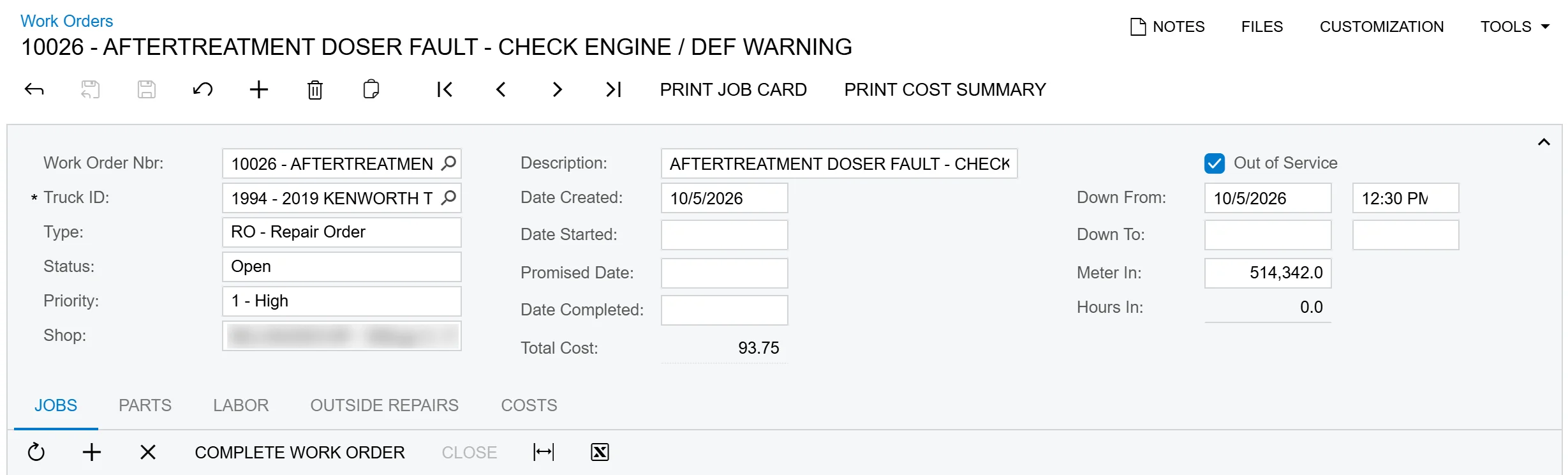
  • Out of Service with down-from and down-to, putting the truck In Shop and back In Service
  • Meter and hours in, recorded as a reading and required to complete
  • Completion stamps the PM service and restarts the clock; a Closed status locks the order for good
  • Printed job card with the jobs, blanks for the mechanic, the parts to pick and signature lines
Work order in Acumatica for an aftertreatment fault, marked Out of Service, with the complaint on the job line
A repair work order with the truck Out of Service

Run the shop from a board

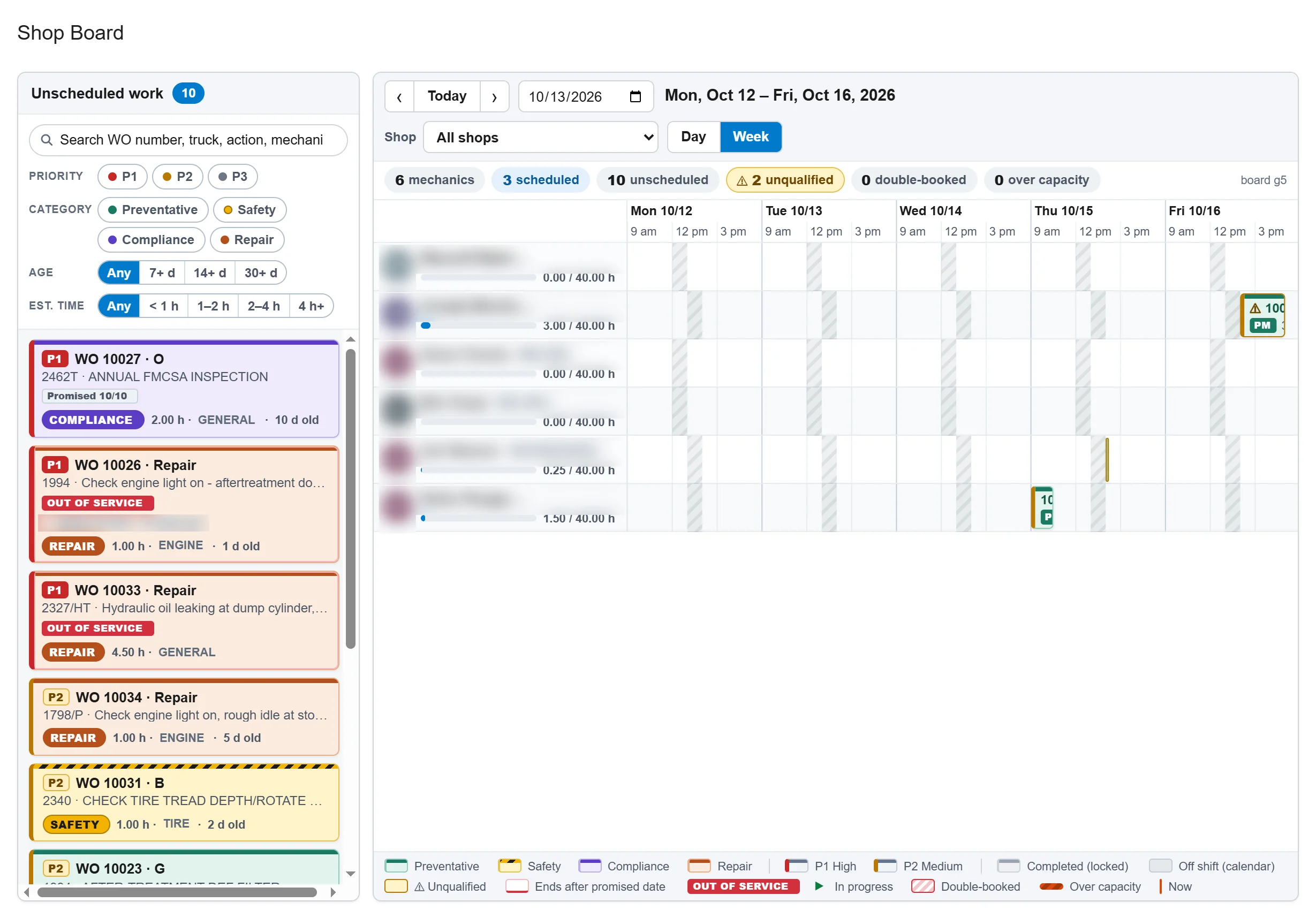
The Shop Board shows every mechanic as a row and every unscheduled job as a card. Drag a card onto a mechanic and the job is booked for its estimated hours on that mechanic's real working calendar: it carries over lunch, nights, weekends and holidays, and the board warns when a drop lands on someone without the right skill or certification.

Shop Board

  • Day and week views per shop, sized to the hours your mechanics actually work
  • Cards show priority, category, truck, system, hours, promised date and Out of Service
  • Qualified and unqualified mechanics flagged as you pick a job up
  • Booked hours against capacity per day, with over-capacity warnings
  • Move, stretch, take off, undo; late jobs flagged against the promised date
  • Double-click opens the work order

Mechanics and My Jobs

  • Mechanics with home shop, skills by vehicle system and certifications with expiry (for example FMCSA brake and annual inspector)
  • Assigning an unqualified mechanic warns with the reason; it never blocks the foreman
  • My Jobs: each mechanic's jobs for today, earlier and not yet scheduled
  • Start and Stop time clock that writes labor to the order in tenths of an hour
Shop Board showing unscheduled work orders as cards beside a weekly calendar of mechanics
The Shop Board: drag unscheduled work onto a mechanic's week

Parts, labor and outside repairs, posted where the controller expects

Parts are stock items in Acumatica inventory, issued from the shop's warehouse as real inventory transactions and returned the same way. Labor comes from the time clock or is typed on the order, at each employee's cost rate. Outside repairs become Acumatica vendor bills. The order totals it all, and the cost reports put it on the truck.

Cost on the order

  • Issue Parts and Return Parts, with live available quantity and low-stock warnings
  • Labor by employee, hours and rate from Acumatica labor cost rates or the shop rate
  • Outside repairs by vendor: create the payable bill from the order, or tag a bill that arrives on its own
  • Parts, labor, outside and total cost on every order
  • Templates fill planned parts, outside repairs and a labor estimate on every new job

Reports, inquiries and alerts

  • Maintenance Cost by Truck per period, with miles driven and cost per mile
  • Open Work Order Aging, Truck Downtime (planned and unplanned), PM Compliance
  • High-priority open work orders and parts below reorder point at shop warehouses
  • Email alerts for overdue PM, trucks down, high-priority orders, low parts and expired permits, built as Acumatica business events
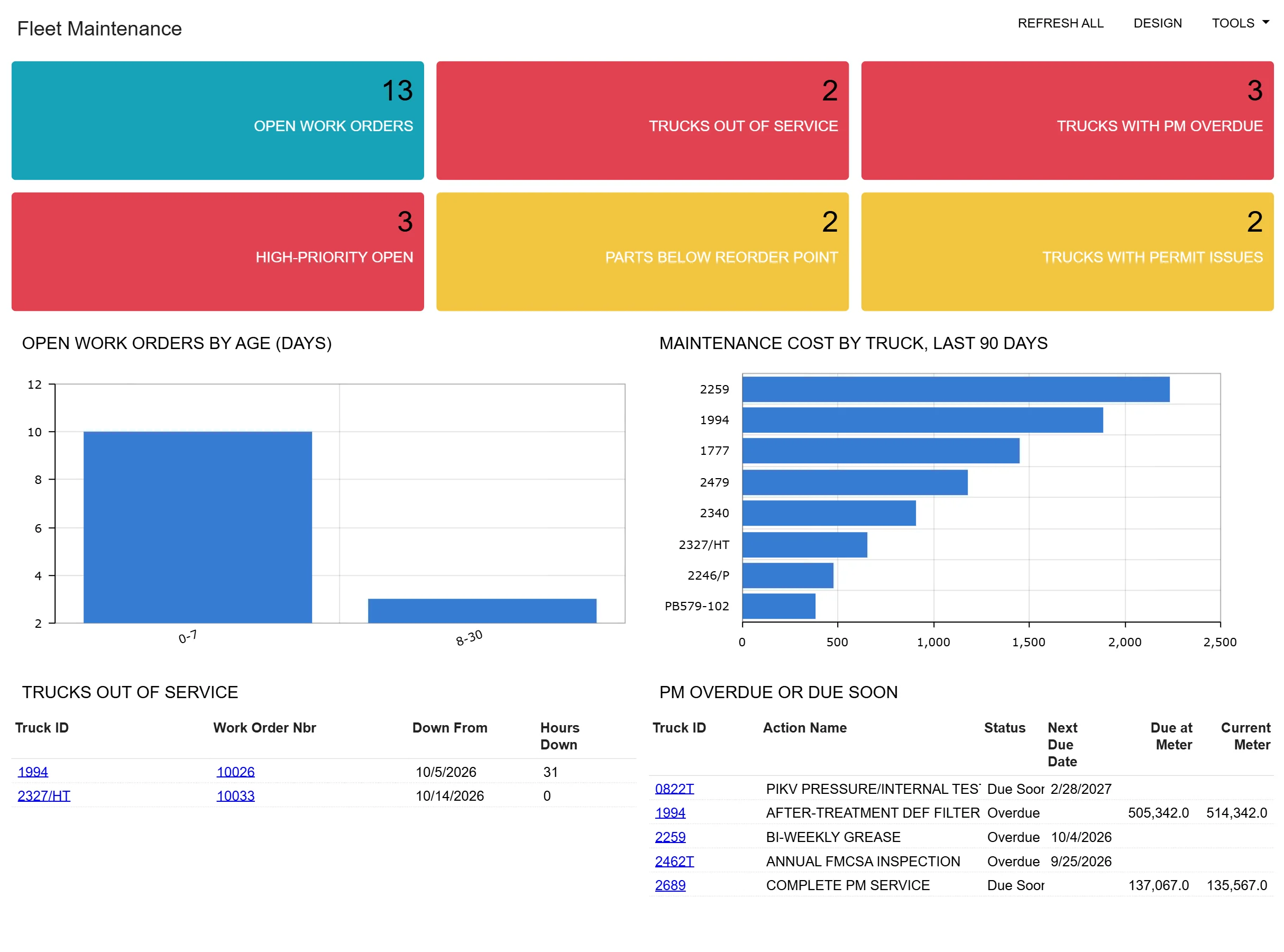
Fleet Maintenance dashboard with open work orders, trucks out of service, PM overdue and maintenance cost by truck
The Fleet Maintenance dashboard
Honest scope The first release does not do lot- or serial-tracked parts, tire tracking, warranty claims or driver inspection reports. Ask us about what is next.
Freight Billing

Rate the load, bill the customer, settle the driver

Freight Billing takes a rated order and produces the customer invoice in Acumatica receivables and the driver or carrier settlement in Acumatica payables, so billing and settlements are not re-keyed into accounting after the fact.

Rates

  • Customer billing rates and rate cards
  • Other charges on the order
  • Settlement rates for drivers and carriers
  • Rating methods and units of measure set up to suit your lanes

Billing and settlements

  • Rate the order or load, then create the invoice from it
  • Consolidated invoicing across several loads
  • Settlements and adjustments, with the payable created from them
  • Carrier and driver settlement processing and a carrier settlement report
  • Order inquiries for the billing desk

Freight Billing and Dispatch are the newest AcuTransportation modules. Ask us where they are in their release cycle and what a first installation looks like.

Dispatch

Orders, legs and stops for the dispatcher

Dispatch holds the order from the shipper to the consignee: the legs, the stops, the driver, the carrier and the truck, with the route map and directions at hand. It uses the same trucks as the shop and the same customers as billing, so a truck that is in for a PM is not quietly assigned a load.

Master data

  • Load types and divisions
  • Drivers and carriers
  • Shippers and consignees with their locations on a map
  • Stops reused across orders

Orders and dispatch

  • Orders with legs and stops
  • Route map and directions from the order
  • Dispatch orders to drivers, carriers and trucks
  • Order inquiries and a loads report
  • PC*MILER mileage and routing: we have integrated with it before; ask us
On a phone too Dispatch orders are also available as an Acumatica mobile screen.
Fuel

Fuel bought, fuel burned, fuel billed

Fuel is one of a fleet's largest costs, and often tracked in a spreadsheet beside the accounting system. The Fuel module keeps it with the trucks, the loads and the ledger.

Fuel Distributions

  • Fuel costs allocated to the trucks that burned them

Fuel Surcharges

  • Surcharges from published fuel prices and your own average fuel rates, applied when the load is rated

Bulk Fueling

  • Fuel drawn from your own tanks, recorded against the truck

Fuel Management

  • Fuel use and cost across the fleet

Ask us where the Fuel module is in its release cycle and what a first installation looks like.

Popular fleet tracking software

Meters and fault codes from the trackers your trucks already carry

Most fleets already pay for a tracking platform. AcuTransportation reads it, so the odometer and engine hours in the maintenance schedule are the real ones. Samsara is connected today: pair each truck with its Samsara vehicle once, enter the API key in preferences, and the data flows without anyone typing odometer readings off a dashboard.

  • Nightly odometer and engine-hour readings for every paired truck, so PM due dates move with the real miles
  • Manual pull for a single truck when you need a reading now
  • Fault codes (J1939 and OBD-II) loaded into Vehicle Diagnostics with the fault time and odometer, then turned into repair orders
  • A reading that goes backwards is reported, not written; an unpaired truck is flagged

Fleet tracking platforms

  • Samsara: integration available today
  • Motive (formerly KeepTruckin), Geotab, Verizon Connect, Omnitracs, Trimble: ask us about your platform
Beyond trucking

Construction and manufacturing, in the same system

Many trucking companies also run construction jobs, haul for their own projects or keep a fabrication shop. Acumatica has industry editions for that work, and they share the same customers, vendors, inventory and general ledger as AcuTransportation.

Acumatica Construction Edition

For contractors and companies that run jobs as well as trucks.

  • Job cost accounting with labor, material, equipment and other costs in real time
  • Project management, budgets and commitments
  • Change order management
  • Equipment management and maintenance
  • Field and mobile apps for crew time, expenses and approvals
  • Construction payroll

Acumatica Manufacturing Edition

For companies that build, fabricate or assemble what they haul.

  • Bills of material and routings
  • Production management with real-time shop floor visibility
  • Material requirements planning (MRP)
  • Advanced planning and scheduling around real capacity
  • Manufacturing estimates and a product configurator
  • Shop floor kiosk and data collection

Construction Edition and Manufacturing Edition are Acumatica products. We scope them alongside AcuTransportation in the same assessment.

See it running

See AcuTransportation on your kind of fleet

Tell us how you bill, dispatch and maintain today, and we will walk you through the same work in Acumatica.